
7 Real-World AI Agent Use Cases That Are Quietly Replacing Entire Teams
Every week there’s a new LinkedIn post about how AI agents are going to change everything. And every week, the top comment asks the same thing. Cool, but what are people actually using them for?
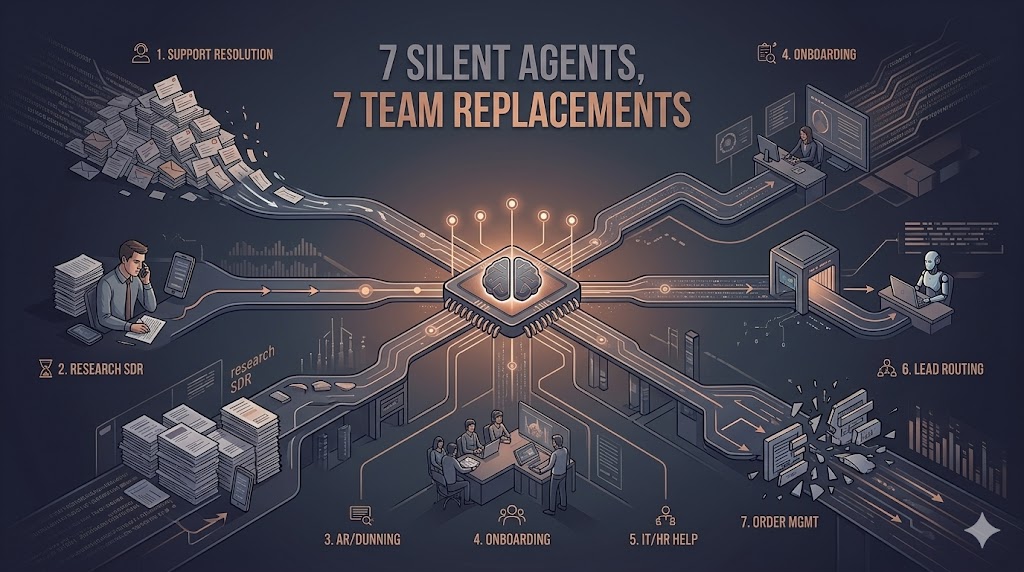
Here are seven answers. Not theory. Not “by 2030.” These are running right now, at companies you probably know, quietly eating work that used to need four to forty humans.
No ranking here. Just pick whichever is closest to your own pain.
1. Customer support resolution (not routing)
What it does: reads an incoming ticket, pulls the customer’s full history from the CRM, checks order status from the backend, applies your refund or replacement or extension policy, and executes the action. Only escalates when the policy genuinely doesn’t cover the case.
The workflow it replaces: tier-1 support agents reading the same 20 questions 300 times a day.
Typical impact: 60 to 80% of tickets resolved end-to-end without a human touching them. Average handle time drops from about 12 minutes to under a minute. CSAT usually goes up, not down, because the customer isn’t sitting in a queue.
What to watch out for: vague policies. The agent will follow them literally. If your refund policy is officially “handled case-by-case,” the agent won’t know what to do.
Related reading: AI Agents vs Chatbots: Why Your “Smart Bot” Is Already Obsolete in 2026.
2. Outbound sales (the SDR killer)
What it does: researches a prospect (LinkedIn, news, public signals), writes a personalized cold email or WhatsApp opener, sends it, handles the reply, qualifies them against your ICP, and books the meeting on the rep’s calendar.
The workflow it replaces: junior SDRs spending 80% of their day on research and follow-up drudgery.
Typical impact: reps stop doing research and start taking real meetings. Sequenced outbound volume goes up 5 to 10x. Reply rates usually go up too, 30 to 70%, because the personalization is actually real.
What to watch out for: don’t send at scale before you’ve tuned for quality. A bad agent outbound program will burn your domain reputation inside a week.
3. Accounts receivable and dunning
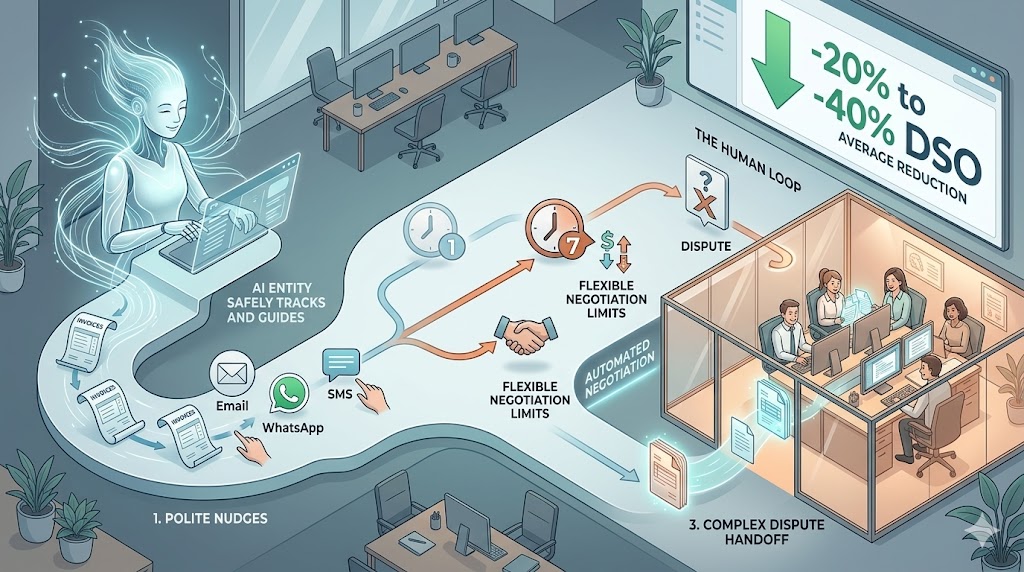
What it does: tracks overdue invoices, sends a polite nudge on day 1, firmer ones on day 7, negotiates within pre-approved ranges, escalates genuine disputes to finance. Works across email, WhatsApp, and SMS.
The workflow it replaces: a collections team that’s mostly copy-pasting templates.
Typical impact: days-sales-outstanding drops 20 to 40%. The finance team stops chasing payments and gets back to doing actual finance work.
What to watch out for: tone. Dunning is the fastest way to lose a customer if your agent sounds cold or robotic. Brand voice tuning really matters here.
4. Onboarding (the forgotten gold mine)
What it does: once a new customer signs up, the agent collects KYC docs, verifies them, sets up accounts across your 6 internal tools, sends welcome content tuned to their use case, and answers setup questions for the first 30 days.
The workflow it replaces: “customer success specialists” who spend their first week with every new customer doing admin work.
Typical impact: time-to-first-value drops from something like 11 days to 2. Churn in the first 90 days drops noticeably, because customers actually get set up instead of ghosting out of frustration.
What to watch out for: this one needs the deepest integrations of the lot. Don’t underestimate the API plumbing work.
5. Internal IT and HR helpdesk
What it does: an employee asks “can you reset my VPN?” or “how much PTO do I have left?” The agent checks the system, resets the VPN, pulls the PTO balance, and opens a Jira ticket when it needs a human approval.
The workflow it replaces: internal IT and HR teams drowning in the same 40 tickets a week.
Typical impact: internal self-serve rate jumps from around 25% to 70% plus. Your IT team stops being a ticket queue and gets back to being a team.
What to watch out for: permission scopes. An agent with write access to your Active Directory needs very tight evals before it ever goes live.
6. Lead qualification and routing
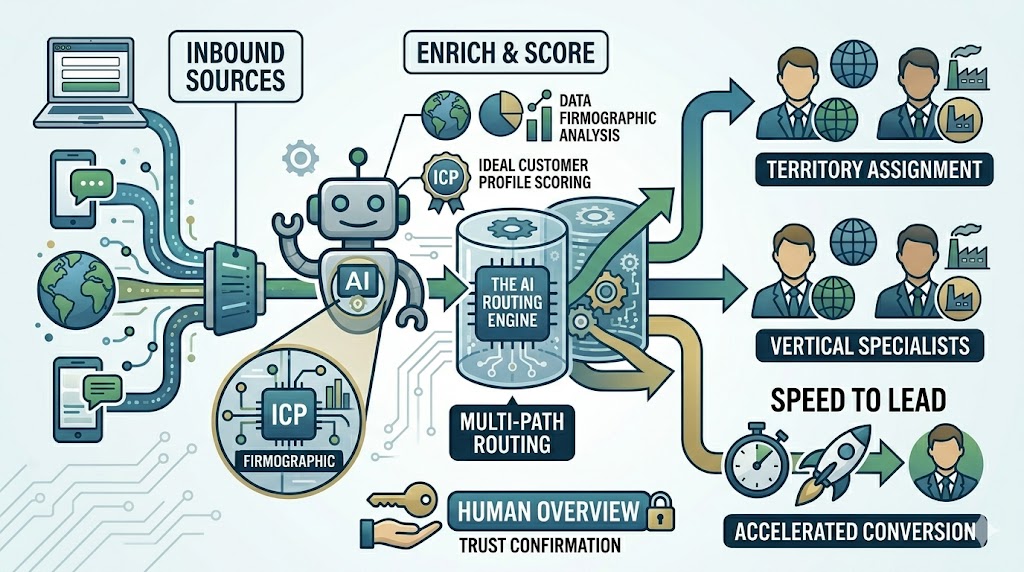
What it does: an inbound form fill or WhatsApp ping gets read by the agent, scored against your ICP, enriched with firmographic data, assigned to the right rep based on territory or vertical, and confirmed back to the lead in under a minute.
The workflow it replaces: marketing ops rules engines that nobody likes, plus the poor SDR who triages inbound.
Typical impact: lead response time drops from “hours” to under 60 seconds. Speed-to-lead is the single biggest predictor of conversion rate, and agents basically own this category now.
What to watch out for: don’t automate the response content if your brand tone matters. Automate the triage, let the human own the reply until you trust the agent’s voice.
7. Order and reorder management (retail and D2C)
What it does: a customer asks “when will my order arrive?” or “I want to reorder what I bought last month” or “change my delivery address.” The agent checks the order, updates the address, processes the reorder, applies loyalty discounts. All from WhatsApp or web chat, no human involved.
The workflow it replaces: the entire order-inquiry queue, plus about half the upsell volume.
Typical impact: for brands on WhatsApp plus e-commerce (Shopify, WooCommerce), 70 to 90% of order queries resolved inline. AOV often goes up, because the agent actually suggests the right reorder or bundle.
What to watch out for: this only works if your order APIs are clean. Messy data means a confused agent, which means an angry customer.
The pattern across all seven
Read that list again. Every winning use case has three things in common.
One, high volume and low variance. Same shape of work, thousands of times. Two, multi-system. It pulls from at least two or three different tools (CRM, inbox, order DB, calendar). Three, clear success metrics: resolution rate, DSO, meetings booked, response time.
If your proposed use case doesn’t hit all three, it’s probably not an agent-shaped problem. It might be a workflow automation problem, a generative AI problem, or a process problem disguised as an AI problem.
Still figuring out which is which? Read Agentic AI vs Generative AI: The Difference That Will Decide Your Next Hire.
The math that convinces CFOs
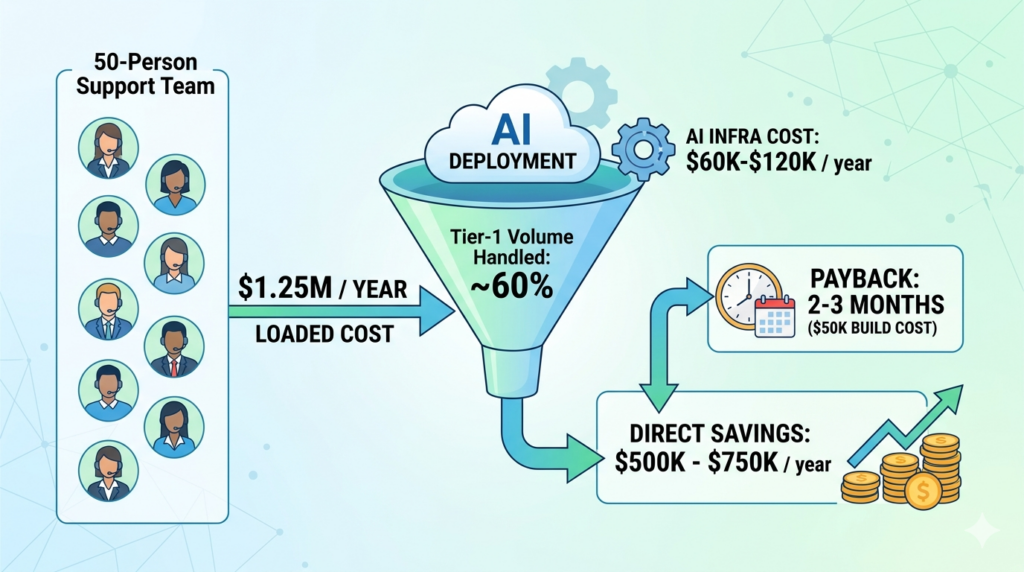
Quick back-of-the-envelope for a 50-person customer support team:
50 agents times $25K a year loaded cost is about $1.25M a year. A good agent deployment handles roughly 60% of tier-1 volume. Direct savings end up around $500K to $750K a year, net of AI infra cost (usually $60K to $120K a year). Payback on a $50K build is in the 2 to 3 month range.
These aren’t “once in a generation” numbers. They’re normal mid-2026 numbers for anyone who picks a narrow use case and ships it well.
Where to start (pick exactly one)
Do not try to deploy all seven at once. Companies that win at this always start with one and expand from there.
A rough rule of thumb we use at ConverseAI:
– Most ROI, least risk: customer support resolution.
– Most ROI but more integration work: onboarding or AR.
– Fastest to visible wins: lead qualification or inbound speed-to-lead.
– Most sensitive to get wrong: outbound sales (brand risk) and IT helpdesk (permissions risk).
Start small. Ship one. Measure. Then expand.
The bottom line
Every one of these workflows used to need a team. In 2026 most of them need one agent, one internal owner, and a dashboard.
The companies that are quiet about it are the ones already doing it.
Want to see which of these seven fits your business best? Book a free AI Readiness Audit. Thirty minutes, one workflow, a buy or build recommendation. Or if you already know what you want built, go straight to Custom AI Agent Development.