
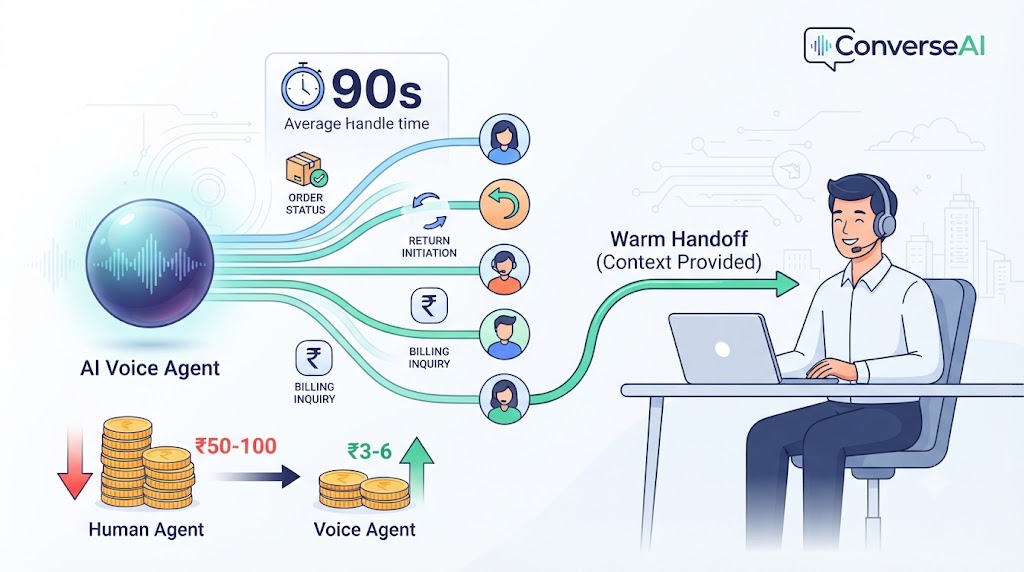
Featured Snippet: AI voice agents for customer support deflect 40-60% of inbound calls by autonomously handling order status, returns, billing inquiries, and FAQs in under 90 seconds. Unlike IVR systems that route calls, voice agents resolve them — pulling live order data, initiating return flows, and updating your CRM without human intervention. The payoff is a cost reduction from ₹50-100 per human-handled call to ₹3-6 per voice-agent call, while CSAT typically improves because wait times collapse.
Customer Support Voice Agents: Deflect 40-60% of Calls Without Losing CSAT
Every support team faces the same paradox: the better your product gets, the more customers you acquire. And the more customers you acquire, the more calls you get. That sounds like a success problem. It isn't.
Because every inbound support call costs money. Real money — agent salaries, training, infrastructure, supervision. And behind every call that costs money, there's a queue. Behind every queue, there's a customer getting impatient. Behind that customer, there's a CSAT score dropping.
The traditional playbook offers two options: hire more agents (expensive, slow, hard to scale) or accept longer queues (which kills satisfaction). Neither is acceptable when you're trying to grow.
AI voice agents for customer support solve the math without sacrificing the experience. A voice agent answers instantly, handles the query in 90 seconds, updates your CRM, and closes the ticket — without a queue, without a waiting customer, and without an incremental headcount cost. The remaining 40-60% of calls that need a human reach one faster, because the agent took the rest.
This post breaks down the mechanics: what voice agents handle, when they hand off, how the cost model works, and — critically — what separates good deflection (CSAT goes up) from bad deflection (CSAT craters).
The Support Cost Problem
High call volume is expensive in ways that compound. The obvious cost is headcount. A mid-size ecommerce business receiving 500 support calls per day needs 15-20 human agents across shifts. At ₹25,000-40,000 per agent per month, the annual cost is ₹45-96 lakhs — before training, attrition, and management overhead.
The less obvious cost is the distribution of those calls. Research consistently shows that 60-70% of inbound support volume is routine: order status, returns and refunds, basic troubleshooting, billing questions, delivery reschedules. These queries don't need an empathetic expert. They need fast data retrieval and a clear answer.
Human agents spend the majority of their time on calls that don't leverage their value — and customers who have a complex issue wait in queue behind customers who just want to know where their order is.
The unit economics break down like this:
Metric | Human Agent | Voice Agent |
Cost per call | ₹50–100 | ₹3–6 |
Average handle time | 5–7 minutes | 1.5 minutes |
Queue impact | Yes — each call blocks next | No — parallel handling |
Operating hours | 8-10 hours/shift | 24/7 |
Scalability | Hire ahead of volume | Scales on demand |
At 500 calls per day, a 50% deflection rate means 250 calls handled by the voice agent at ₹3-6 each (₹750-1,500/day) versus ₹50-100 each on humans (₹12,500-25,000/day) — a daily saving of ₹11,750-23,500, before counting the improved throughput for your human team.
What Customer Support Voice Agents Handle
The most important thing to understand about voice agent scope is that it should be defined by resolution complexity, not by subject area. "Billing" is not a monolithic category — a billing inquiry that requires looking up an invoice number is easy; a billing dispute involving a fraudulent charge is not.
Here is what well-scoped support voice agents handle reliably:
Order Status and Tracking
Pull live order data from your OMS or CRM. "Your order #48201 is in transit with Blue Dart. Expected delivery: August 28. Would you like to set a delivery reminder?" Complete resolution, no human needed.
Return and Refund Initiation
Verify the order, check return eligibility against policy, initiate the return flow, generate a return label or pickup request, and confirm timeline. "Your return for the blue jacket has been initiated. You'll receive a pickup request within 24 hours and refund in 5-7 business days."
Appointment and Delivery Rescheduling
Check available slots, confirm rescheduling with the caller, update the system, and send confirmation. No human in the loop unless slot availability requires judgment.
Basic Troubleshooting
Step-by-step guided troubleshooting for common product issues — "Let's restart the device: hold the power button for 10 seconds..." — with escalation if the standard script doesn't resolve in two attempts.
Billing Inquiries
Statement lookups, payment due dates, last payment confirmation, EMI schedules. Not billing disputes — those go to a human.
Account Updates
Address changes, phone number updates, communication preference changes. Anything that requires identity verification (like password resets) needs a secure verification flow but can still be handled autonomously.
FAQ and Policy Answers
Return windows, warranty terms, shipping policies, refund timelines, store hours. The voice agent draws from your knowledge base and answers in natural language — not by reading out a policy document.
What Voice Agents Don't Handle Well
Be honest about this. Voice agents are bad at:
Complex complaints involving multiple failure points — a damaged order that also arrived late and also has a billing discrepancy requires human judgment and relationship management.
Emotionally distressed customers — someone who is genuinely upset about a significant failure needs empathy, not efficiency. Sentiment detection exists precisely to catch this and escalate.
Edge cases outside defined policy — "My order is two days late and I need it for my mother's surgery tomorrow" is not a standard return flow. A voice agent that tries to resolve this will make it worse.
High-stakes account actions — account closures, large refunds, fraud claims, legal escalations.
The rule of thumb: if resolution requires discretion or empathy, it should go to a human. If resolution requires data retrieval and policy application, a voice agent handles it better than a human does — faster, consistently, without variation.
The Escalation Architecture: When Agents Hand Off to Humans
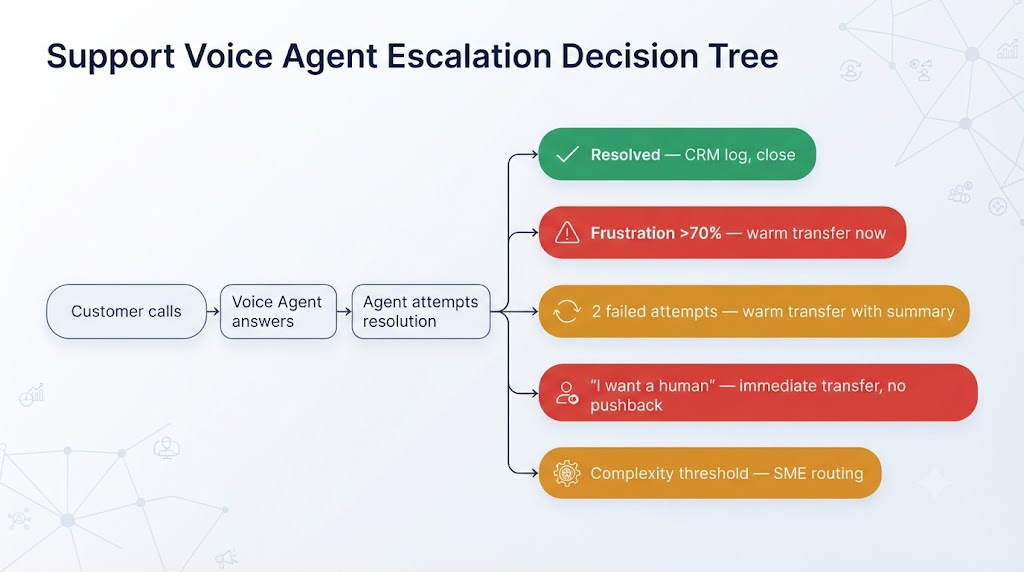
Deflection without a good escalation architecture is a liability, not an asset. The escalation rules are what separate a support voice agent that improves your operation from one that traps customers in loops.
ConverseAI builds escalation on four triggers:
1. Sentiment Threshold — Frustration Above 70%
The voice agent monitors caller tone in real time. When frustration scoring (pitch, pace, word choice) exceeds 70%, the agent proactively offers escalation — not as a failure, but as a service. "I can hear this has been frustrating. Let me get you to one of our support specialists right away."
2. Two-Failed-Attempt Rule
If the agent makes two attempts to resolve a query and the caller confirms the issue is not resolved, the escalation is automatic. No third attempt. Looping a customer through a third failed resolution attempt is the single fastest way to destroy CSAT.
3. Explicit Human Request
Any variation of "I want to speak to a person," "connect me to a human," "get me your manager" triggers immediate escalation, no friction. The agent never argues with this request.
4. Complexity Threshold
Queries that hit defined complexity flags — multiple issue types in one call, fraud-adjacent language, legal references, unusually large transaction values — route to a human even if the caller hasn't asked.
The Warm Handoff
Escalation done badly means the customer has to repeat their story to the human agent. That's a CSAT killer. Every ConverseAI support voice agent performs a warm handoff: before transferring, the agent generates a call summary — caller ID, account details pulled, issue described, steps already taken, sentiment reading — and delivers it to the human agent before they pick up. The human answers already briefed. "I can see you're calling about order #48201 and a return that was initiated but hasn't been confirmed — let me look into that right now."
CSAT Impact: Does Deflection Actually Hurt Satisfaction?
This is the question most CX directors ask first, and the honest answer is: it depends entirely on how the deflection is designed.
The surprise finding: well-deployed voice agents typically improve CSAT, because wait times collapse. A customer who gets a resolution in 90 seconds with no queue gives higher satisfaction scores than a customer who waits 8 minutes for a human to do the same thing. Speed is a CSAT driver — especially for routine queries.
The metric to watch is resolution rate, not deflection rate. A voice agent that deflects 60% of calls and resolves 85% of those deflected calls is a success. A voice agent that deflects 60% of calls and resolves 40% is a disaster — it's trapping 36% of your total call volume in a failed loop.
When bad deflection kills CSAT:
The agent loops — same question, same failed answer, no way out
The agent cannot pass to a human (or makes it difficult)
The agent resolves incorrectly — tells the customer the return was initiated when it wasn't
The escalation queue is longer than the original queue (now the customer waited twice)
The human agent has no context from the voice agent call
The design principle: deflection success is measured by what happens to the customer after the call, not by how many calls the agent handled. Build your resolution rate reporting before you build your deflection rate reporting.
Real-World Example: Ecommerce Support Voice Agent in Action
Here is a step-by-step walkthrough of a voice agent handling one of the most common ecommerce support calls: order status with a potential return.
The Call:
Customer dials the support line at 11:42 PM on a Sunday.
Step 1 — Instant Answer
Voice agent picks up in under 2 seconds. No queue. "Hi, thanks for calling [Brand] support. I'm an AI assistant and can help with orders, returns, and account questions. What can I help you with today?"
Step 2 — Intent Identification
Customer: "I ordered a pair of shoes last week and I still haven't got a tracking update."
Agent identifies intent: order status inquiry.
Step 3 — Verification
"I can pull that up. Could you give me the mobile number on your order?" Customer provides number. Agent verifies against CRM — order found.
Step 4 — Live Data Pull
Agent queries OMS in real time. "Your order #67432 — the blue Nike running shoes — shipped on August 21st and is currently in transit with Delhivery. The expected delivery date is August 28th. Would you like me to send the tracking link to your number?"
Step 5 — Proactive Resolution
Customer: "Okay. But if they don't arrive by the 28th, I want to return them."
Agent: "Understood. Your order is within our 30-day return window, so you'll have until September 20th to initiate a return if needed. Would you like me to note that preference on your account?"
Step 6 — CRM Logging
Agent logs the call: order queried, delivery date confirmed, return window communicated, customer preference noted. Ticket created and closed — status: Resolved.
Step 7 — Call Closes
Total call time: 87 seconds. No human involved. Customer has a clear answer, a tracking link, and a confirmed return window. At 11:42 PM.
That call — which would have sat in a queue until Monday morning — resolved instantly and logged automatically. Multiply that across 200 similar calls per day.
Building the Right Scope: What Goes to Voice Agent vs Human
The decision matrix below gives a starting point for scoping your voice agent. Customize this for your actual call mix using data from your current ticket categories.
Query Type | Volume (Typical) | Resolution Complexity | Voice Agent | Routing Note |
Order status / tracking | Very High | Low | Yes | Full resolution |
Delivery ETA update | High | Low | Yes | Full resolution |
Return initiation | High | Low-Medium | Yes | With policy check |
Refund status | High | Low | Yes | Full resolution |
Appointment reschedule | Medium | Low | Yes | With slot availability check |
FAQ / policy questions | Medium | Low | Yes | Knowledge base draw |
Billing inquiry (lookup) | Medium | Low | Yes | Full resolution |
Basic troubleshooting | Medium | Medium | Yes | With 2-attempt escalation rule |
Account update (address, phone) | Medium | Low | Yes | With verification |
Billing dispute | Low | High | No | Route to human immediately |
Damaged / wrong item (complex) | Low | High | No | Route to human immediately |
Fraud claim | Low | High | No | Route to human immediately |
Complaint escalation | Low | High | No | Route to human immediately |
Legal / regulatory | Very Low | Very High | No | Route to human immediately |
Start with the top half of this table. Get resolution rates above 80% before expanding scope. Do not try to handle the bottom half with a voice agent — it will cost you more in CSAT than you save in cost.
Cost Model: When Support Voice Agents Pay For Themselves
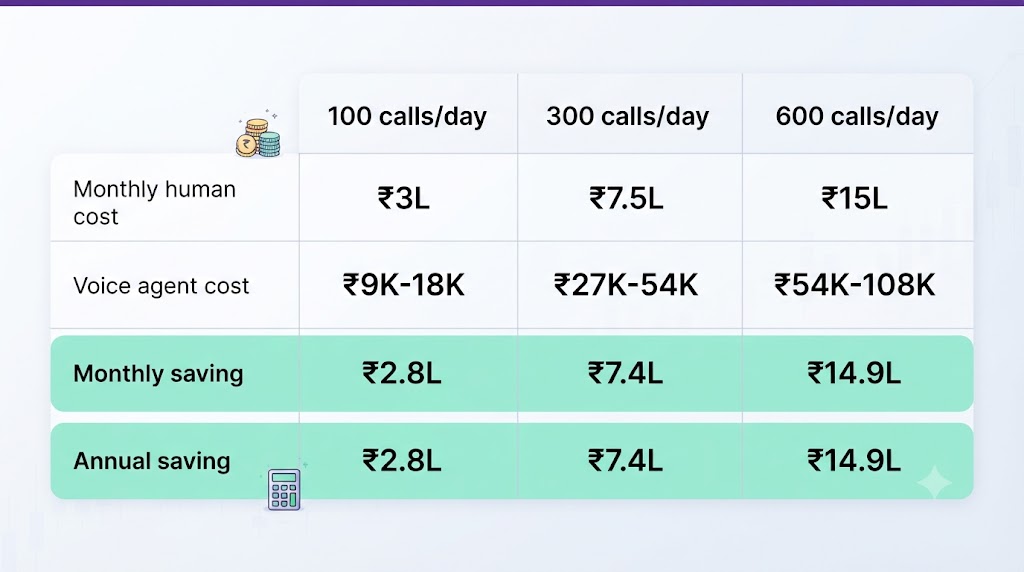
The break-even point for a support voice agent is approximately 100+ calls per day. Below that volume, the fixed setup and integration costs outweigh the per-call savings. Above it, the economics compound quickly.
Daily Call Volume | Human Team Annual Cost | Voice Agent Annual Cost | Annual Saving |
100 calls/day | ₹18–27 lakhs | ₹1.1–2.2 lakhs | ₹16–25 lakhs |
300 calls/day | ₹55–82 lakhs | ₹3.3–6.6 lakhs | ₹49–76 lakhs |
600 calls/day | ₹110–165 lakhs | ₹6.6–13.2 lakhs | ₹97–152 lakhs |
Assumptions: 50% deflection rate; human call cost ₹75 average; voice agent cost ₹4.5 average; 300 operating days per year.
The model above covers direct call costs only. It excludes:
Queue reduction benefit — human agents handling fewer calls = shorter queues for complex calls = higher CSAT for those callers
24/7 coverage — voice agents handle off-hours calls that currently go to voicemail or after-hours fees
Consistency — no bad days, no off-script agents, no training drift
Scalability — a spike in call volume (sale event, product issue) handled without emergency hiring
For businesses already running a support operation, the ROI case is straightforward. For businesses scaling past 100 calls/day for the first time, voice automation is the smarter first hire.
Integration Requirements: What the Agent Needs to Actually Work
A voice agent that can't look up your customer's order is a very expensive FAQ bot. The integrations are what make the deflection rate real.
CRM Read Access
The agent needs to query customer records: name, account status, order history, previous support tickets, return history. Without this, the agent can only answer generic questions — it cannot handle the 60-70% of calls that require account-specific information.
OMS / Order Database
For ecommerce, this is the most critical integration. Real-time order status, tracking number, fulfillment status, delivery date — the agent needs live data, not a cached snapshot.
Ticketing System Write Access
Every call the voice agent handles should generate a ticket: what was asked, what was resolved, what was escalated, caller sentiment. This closes the loop for your support operations team and feeds resolution rate reporting.
Knowledge Base
The agent draws FAQ and policy answers from your knowledge base. The quality of this knowledge base directly determines the quality of FAQ responses. A well-maintained knowledge base with clear, specific policy statements significantly outperforms a sparse or ambiguous one.
Escalation Queue Integration
When the agent hands off to a human, it needs to push the call — with the summary — to your live queue system. The integration here determines whether the warm handoff is actually warm.
What ConverseAI builds and operates includes all five integration layers as part of the managed deployment. We connect to your existing systems (Salesforce, Zoho, Freshdesk, custom OMS), tune the escalation thresholds, build the knowledge base from your existing documentation, and monitor resolution rates post-deployment. This is not a product you install — it's a system you operate. We do both.
Ready to see the math for your call volume? Talk to the ConverseAI team about a support voice agent scoped for your specific operation.
Frequently Asked Questions
Q. What is an AI voice agent for customer support?
An AI voice agent for customer support is a conversational system that handles inbound support calls autonomously — looking up orders, initiating returns, answering billing questions, and resolving FAQs without a human agent. It connects to your CRM and OMS in real time, so responses are specific to each customer's account, not generic scripts.
Q. What percentage of support calls can a voice agent deflect?
Well-deployed support voice agents deflect 40-60% of inbound calls. The range depends on your call mix — businesses with high volumes of order status, return, and billing queries hit the upper end. Businesses with complex, edge-case-heavy call mixes land closer to 40%.
Q. Does call deflection hurt CSAT scores?
When designed correctly, voice agents typically improve CSAT because wait times drop. The risk comes from bad deflection: agents that loop, fail to resolve, or make it hard to reach a human. Resolution rate is the metric to watch. High deflection with low resolution is a CSAT problem. High deflection with high resolution is a CSAT improvement.
Q. How much does a support voice agent cost per call?
A voice agent costs approximately ₹3-6 per call, compared to ₹50-100 per call for a human agent. At 100+ calls per day, the economics shift decisively in favour of voice automation.
Q. When does a voice agent escalate to a human?
Escalation triggers include: frustration sentiment above 70%, two failed resolution attempts, an explicit customer request for a human, and queries that exceed the agent's defined complexity threshold. The agent performs a warm handoff — summarising the call for the human agent before transferring.
Q. What types of queries should NOT go to a voice agent?
Complex complaints involving multiple failure points, emotionally distressed customers, billing disputes and fraud claims, account closures, and legal escalations should route directly to a human. The decision rule: if resolution requires discretion or empathy, it should not go to a voice agent.
Q. How accurate is voice recognition for Hindi-speaking callers?
Hindi ASR currently sits at 72-85%, compared to 95%+ for English. The gap reflects global training data imbalances. Domain-specific tuning — for the vocabulary of your specific support queries — improves accuracy significantly for both languages.
Q. How long does it take a voice agent to handle a support call?
A well-scoped support voice agent handles routine queries in 1.5 minutes on average, compared to 5-7 minutes for a human agent. Simple queries (order status, FAQ) often close in under 90 seconds.
Q. What systems does a support voice agent need to integrate with?
At minimum: CRM read access (order history, account details), ticketing system write access (to log and close tickets), a knowledge base (for FAQ and policy answers), and an escalation queue connection. Without CRM access, the agent can only handle generic queries — it cannot look up specific order or account data.
Q. How is a voice agent different from an IVR system for customer support?
An IVR routes calls — it can get you to the right queue, but it can't resolve your issue. A voice agent resolves calls. It listens to natural language, pulls account data, makes decisions, and completes the transaction. The resolution rate for voice agents (40-80% of calls handled) vs IVR (15-25% of calls resolved) reflects this fundamental difference. See the full comparison in Voice Agents vs IVR.
Q. Can a voice agent handle multilingual support?
Yes. ConverseAI builds voice agents for English, Hindi, and Hinglish (code-switched) support. Regional language support (Tamil, Telugu, Gujarati) is available for high-volume deployments where the additional tuning effort is justified. Each language layer has its own ASR tuning and NLU context.
Q. What is the break-even point for a support voice agent?
The break-even is approximately 100+ calls per day. Below that volume, fixed setup and integration costs outweigh per-call savings. Above that threshold — especially at 200+ calls per day — the ROI compounds quickly across direct cost savings, queue reduction, and 24/7 coverage.
Related Reading
The Complete AI Voice Agents Guide — architecture, capabilities, and deployment framework
Voice Agents vs IVR — IVR routes. Voice agents resolve. The difference matters for CSAT.
Voice Agents vs Chatbots — when text support is enough and when voice is the right channel
Appointment Reminder Voice Agents — outbound use case, same underlying architecture
How to Build a Voice Agent — technical walkthrough for teams building in-house
AI Voice Agents Service — ConverseAI — managed deployment, integration, and operations
AI Strategy Readiness Audit — assess where voice agents fit in your broader automation roadmap
ConverseAI builds and operates AI agent systems for 50+ businesses across India and the US — 100+ AI systems deployed, 500+ integrations, Meta Tech Provider Partner. Founded 2021.
Ready to get started?
Getting 100+ support calls a day with routine questions eating your team's time? Book a free call to see how support voice agents deflect 40-60% without touching CSAT.
Book your free discovery call → theconverseai.com/book-demo